Logo Notes
Notes

  • Home
  • Blog
    • Archives

    • Series

    • Categories

      List of Categories

    • Tags

      List of Tags

    • Authors

  • Animations
  • Support
    • The HBS Support Community
    • Repository

    • Discussions

      Ask and discuss questions with others.

    • Bug Report

      Tell us about a bug or issue.

    • Features Request

      Suggest new or updated features.


    • Get Involved

    • FAQs


/

  • Github Linkedin Patreon Paypal Website X RSS

  • Language
    • Nederlands
    • ✓ English

  • Font Size
  • Palette
  • Mode

Windows Server 2022 Home Lab — AD DS, DNS, CA and Secured RDP
Download as Word document This article describes the full build of a two-server Windows Server 2022 home lab in Proxmox VE. Together, the two virtual machines provide Active Directory Domain Services, DNS, Group Policy and a Certificate Authority (ADCS). RDP connections are secured with PKI certificates so the Mac Mini M1 management workstation connects without certificate warnings. This is part 3 of the series on building a Windows DevOps lab in Proxmox. In part 1 I described how to create a VM, and in part 2 how to prepare the template.
Windows Server 2022 in Proxmox — Template Preparation
Download as Word document This is part 2 of the series on building a Windows DevOps lab in Proxmox. In part 1 I described how to create the VM. In this article I prepare the VM as a reusable Proxmox template. All future VMs — the CA server, member servers and other roles — will be cloned from this template. Important: After Sysprep, never start the VM again. If you do, the generalization is consumed and the template must be rebuilt from scratch.
Windows Server 2022 in Proxmox — Creating a VM
Download as Word document In this article I describe step by step how I create a Windows Server 2022 VM in Proxmox VE 9.1.6. The guide is based on real-world experience and includes all corrections and lessons learned along the way. This is part 1 of a series on building a fully functional Windows DevOps lab in Proxmox. Lab Environment Component Value Proxmox host macpro2013.local — Mac Pro 2013 Trashcan Proxmox version 9.1.6 RAM 128 GB Storage 3.6 TB NVMe (local-lvm pool) Network bridge vmbr0 — internal lab network (192.168.178.x) Proxmox WebUI https://192.168.178.205:8006 Why a CA Is Needed — the SSL Warning Anyone who opens the Proxmox WebUI via macpro2013.local in Safari will immediately see a certificate warning. Proxmox uses a self-signed certificate by default.
Windows Server 2022 — Active Directory and DNS Installation
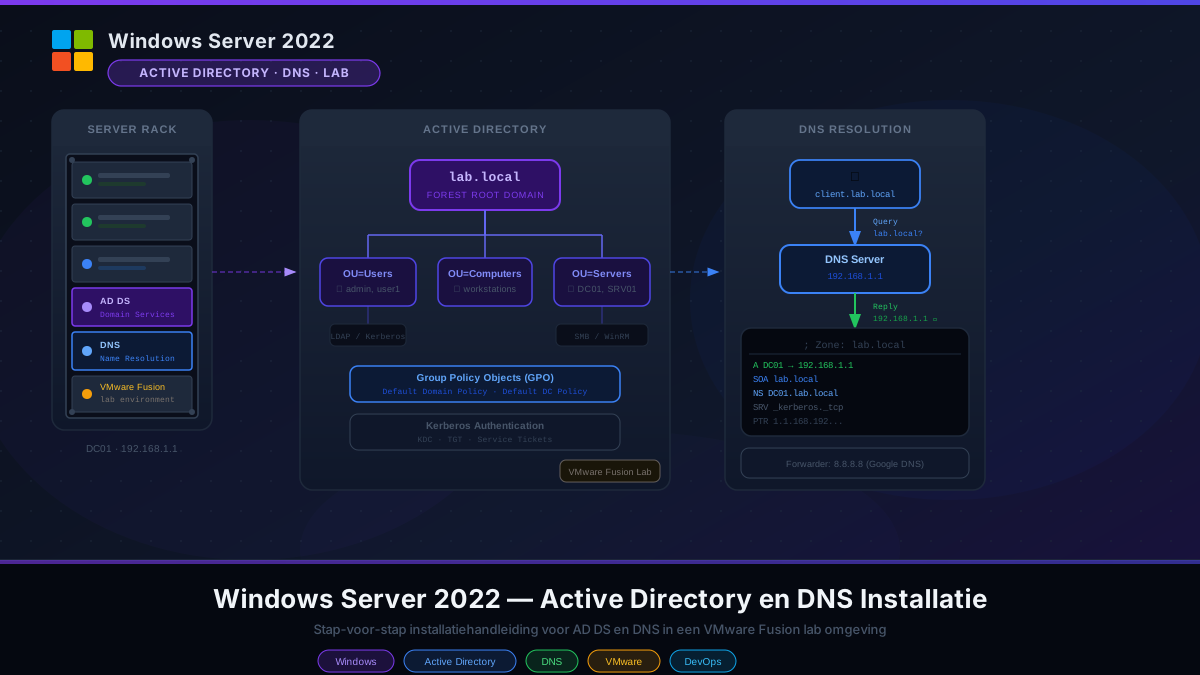
This article describes step by step how I installed Active Directory Domain Services (AD DS) and DNS on a Windows Server 2022 Datacenter VM in a VMware Fusion lab environment. The result is a fully functional domain controller for the domain lab.local, serving as the foundation for a Windows DevOps lab. Environment Component Value Virtualization VMware Fusion (macOS) Guest OS Windows Server 2022 Datacenter (Desktop Experience) Hostname DC01 Domain name lab.local NetBIOS name LAB Lab network adapter Ethernet1 — 172.16.37.10 (static IP) Internet adapter Ethernet0 — DHCP via VMware NAT Step 1 — Configure Networking Before installing Active Directory, the domain controller needs a static IP address. AD DS and DNS depend on a stable address.
Windows Packet Capturing for LDAPS Analysis
Troubleshooting LDAPS Connectivity: Using Built-in Windows Tools to Audit Firewall Compliance As organizations move toward more secure infrastructure, migrating from standard LDAP (Port 389) to LDAPS (Port 636) is a critical step. However, this transition often reveals “silent” failures where a network firewall might allow the initial connection but block the subsequent SSL/TLS handshake. At Van den Boom Online, we understand that a smooth user experience starts with a robust backend. In this guide, we’ll show you how to perform packet capturing using only built-in Windows tools to verify if your traffic is reaching its destination or being dropped by security appliances.
Previous Next

Introduction

June 13, 20221 min read Razon Yang Introduction DocsFeatures

Hugo Bootstrap Theme(HBS) is a fast, responsive, multipurpose and feature-rich Hugo theme. It is used for blog and document sites typically.

Read More

Azure DevOps — Part 2: Your First YAML Pipeline

cover.png
April 14, 20264 min read Azure Devops Azure DevOps LabAzure-DevopsCi-CdLabPipelinesPowerShellWindowsYAML

From YAML in a Git repo to a running CI pipeline on a Microsoft-hosted Windows agent: walking through the pipeline wizard, reading the job log and using built-in ADO variables.

Read More

Azure DevOps — Part 1: Repos, Branches, Policies and Pull Requests

screenshot-11-feature-branch.png
April 14, 20264 min read Azure Devops Azure DevOps LabAzure-DevopsBranch-PolicyGitLabPull-RequestReposWindowsYAML

A hands-on introduction to Azure DevOps Repos: creating a Git repository, setting branch policies on main, working with feature branches and completing the full Pull Request workflow.

Read More

Windows Server 2022 Home Lab — AD DS, DNS, CA and Secured RDP

Windows Server 2022 Home Lab — AD DS, DNS, CA and Secured RDP
April 2, 20269 min read ing. M.A.C.M. (Martijn) van den Boom Windows DocsActive DirectoryCertificate AuthorityDevOpsDNSGroup PolicyLabPKIPowerShellProxmoxRDPSecurityWindows Server 2022

Complete step by step guide to building a Windows Server 2022 home lab in Proxmox, including AD DS, DNS, Certificate Authority, Group Policy and secured RDP from macOS.

Read More

Windows Server 2022 in Proxmox — Template Preparation

Windows Server 2022 in Proxmox — Template Preparation
March 31, 20266 min read ing. M.A.C.M. (Martijn) van den Boom Windows DocsDevOpsLabPowerShellProxmoxSysprepTemplateVirtIOVirtualizationWindows Server 2022

Step by step guide for preparing a Windows Server 2022 Proxmox template. From first boot to Sysprep, including VirtIO drivers, Windows Update via PowerShell and all basic settings.

Read More

Windows Server 2022 in Proxmox — Creating a VM

Windows Server 2022 in Proxmox — Creating a VM
March 30, 20267 min read ing. M.A.C.M. (Martijn) van den Boom Windows DocsDevOpsLabProxmoxVirtIOVirtualizationVMWindows Server 2022

Step by step guide for creating a Windows Server 2022 VM in Proxmox VE 9.1.6. With correct wizard settings, screenshots and lessons from real-world experience.

Read More

Windows Server 2022 — Active Directory and DNS Installation

Windows Server 2022 — Active Directory and DNS Installation
March 27, 20265 min read ing. M.A.C.M. (Martijn) van den Boom Windows DocsActive DirectoryDevOpsDNSDomain ControllerLabVMwareWindowsWindows Server 2022

Step-by-step installation guide for Active Directory Domain Services and DNS on Windows Server 2022 in a VMware Fusion lab environment. Includes screenshots of every step.

Read More

Windows Packet Capturing for LDAPS Analysis

Windows Packet Capturing for LDAPS Analysis
January 18, 20263 min read ing. M.A.C.M. (Martijn) van den Boom DocsLDAPSNetworkingPktmonSecurityTLSWindows

Packet capturing with built-in Windows tools to troubleshoot LDAPS connectivity issues.

Read More

Install Ansible AWX 24.6.1 in Minikube on Ubuntu 24.04.2 LTS in a Single VM

Install Ansible AWX 24.6.1 in Minikube on Ubuntu 24.04.2 LTS in a single VM
July 2, 20254 min read ing. M.A.C.M. (Martijn) van den Boom DocsAnsibleAWXInstallMinikubeUbuntu

This will explain how to install Ansible AWX 24.6.1 in Minikube on Ubuntu 24.04.2 LTS in a single VM

Read More

Install Red Hat Ansible Automation Platform 2.5 in a Single VM

Install Red Hat Ansible Automation Platform 2.5 in a single VM
June 29, 20252 min read ing. M.A.C.M. (Martijn) van den Boom DocsAnsibleAutomationPlatformRedHatRHEL

This will explain how to install Red Hat Ansible Automation Platform 2.5 in a single VM

Read More
  • ««
  • «
  • 1
  • 2
  • 3
  • 4
  • 5
  • »
  • »»
Profile
ing. M.A.C.M. (Martijn) van den Boom

Computer Infrastructure Engineer
ingenieur, docent en mentor

Consultancy
The Netherlands
AboutContact
Taxonomies
Docs 68 Azure DevOps Lab 2 Documentation 1
Shortcode 9 Deployment 7 Widget 5 Configuration 4 Windows 4 Azure 2 Devops 2 Layouts 2 Markdown 2 Archive 1 ALL 30
Lab 6 DevOps 4 Windows 4 Windows Server 2022 4 Installation 3 PowerShell 3 Proxmox 3 YAML 3 Active Directory 2 Ansible 2 ALL 148
Razon Yang 39 ing. M.A.C.M. (Martijn) van den Boom 10 Hugo Authors 5 Andreas Deininger 1 Wilson E. Alvarez 1
2026 7 2025 5 2024 1 2023 2 2022 29 2021 24 2020 4 2019 4
Posts
  • Windows Server 2022 Home Lab — AD DS, DNS, CA and Secured RDP
    Windows Server 2022 Home Lab — AD DS, DNS, CA and Secured RDP
    April 2, 2026
  • Windows Server 2022 in Proxmox — Template Preparation
    Windows Server 2022 in Proxmox — Template Preparation
    March 31, 2026
  • Windows Server 2022 in Proxmox — Creating a VM
    Windows Server 2022 in Proxmox — Creating a VM
    March 30, 2026
  • Windows Packet Capturing for LDAPS Analysis
    Windows Packet Capturing for LDAPS Analysis
    January 18, 2026
  • Install Ansible AWX 24.6.1 in Minikube on Ubuntu 24.04.2 LTS in a single VM
    Install Ansible AWX 24.6.1 in Minikube on Ubuntu 24.04.2 LTS in a Single VM
    July 2, 2025
  • cover.png
    Azure DevOps — Part 2: Your First YAML Pipeline
    April 14, 2026
  • screenshot-11-feature-branch.png
    Azure DevOps — Part 1: Repos, Branches, Policies and Pull Requests
    April 14, 2026
  • Windows Server 2022 Home Lab — AD DS, DNS, CA and Secured RDP
    Windows Server 2022 Home Lab — AD DS, DNS, CA and Secured RDP
    April 2, 2026
  • Windows Server 2022 in Proxmox — Template Preparation
    Windows Server 2022 in Proxmox — Template Preparation
    March 31, 2026
  • Windows Server 2022 in Proxmox — Creating a VM
    Windows Server 2022 in Proxmox — Creating a VM
    March 30, 2026

Authors

Authors
Razon Yang 39 ing. M.A.C.M. (Martijn) van den Boom 10 Hugo Authors 5 Andreas Deininger 1 Wilson E. Alvarez 1
Actions
X Facebook LinkedIn

Go back Reload Copy URL

Martijn's Notes

Practical IT engineering notes by Martijn van den Boom on Windows Server, Proxmox, Linux, automation, networking, and DevOps.

- van den Boom © 2026 -

Build with ❤️ from the Hugo and the HBS theme.
    • Support
    • Repository
    • Discussions
    • Features Request
    • Bug Report
    • Get Involved
    • Contact
    • Docs
    • Getting Started
    • Configuration
    • Look and Feel
    • A comparison of the resource usage of Kubernetes and OpenShift
    • Golang / Go: The Smart Programming Language for Efficient Software and Concurrency
    • Install Ansible AWX 24.6.1 in Minikube on Ubuntu 24.04.2 LTS in a single VM
    • Install Red Hat Ansible Automation Platform 2.5 in a single VM
    • Markdown Syntax Guide
    • The statement 'beware of Kubernetes, it burns through your resources'
    • Content
    • Hooks
    • Features
    • Search Layout
    • Image Processing
    • PWA
    • Image Viewer
    • Comments Widget
    • Funding Widget
    • Sponsor
    • PayPal
    • Ko-fi
    • Open Collective
    • Patreon
Powered by Digital Ocean Deploys by Netlify Search powered by DocSearch